Year-End Expense Cut-Off: 6 Steps for Finance Before the December Books Close
December invoices arrive in January, reimbursements pile up, and card transactions lack receipts. Here is how finance can set an expense cut-off before the year-end close.


A finance lead marks the cut-off date on the year-end calendar before the December books close.
A year-end expense cut-off is a deadline you set so that every expense is recorded in the right period. The approach: set an internal deadline early in December, chase proof for card transactions and reimbursements, list goods or services received but not yet billed, review prepayments and annual subscriptions, then reconcile before the period is locked. How to account for each item should be confirmed with your accountant or auditor.
In short:
- Cut-off is not about the payment date. It is about when the goods or services were received.
- What leaks most often: invoices that arrive in January, late reimbursements, card transactions without receipts, and annual subscriptions.
- Announce the internal deadline before December gets going, not after.

Want card transactions, receipts, and approvals collected in one place before the close? Take a look at the Monit Expense Management page.
Why Does Year-End Spending Leak So Often?
In the last week of December, three things tend to happen at once: teams want to use up the remaining budget, vendors are busy closing their own year, and half the staff are already on leave. Finance ends up receiving a pile of receipts, bills, and questions at exactly the moment the fewest people can answer them.

The problem is rarely that someone was careless. It is that there is no line. An employee submits a reimbursement on 28 December and assumes it "counts this year". A vendor sends an invoice on 5 January for work finished on 20 December. A card is used for an annual subscription whose benefit runs through next year. Each looks small, but together they make the December report stop reflecting reality.
A cut-off makes those decisions explicit instead of accidental. For a tidy pattern all year round, reconciliation and handling of missing proof of transactions (in Indonesian) remain the foundation.
If you want to see how card transactions and proof can be gathered before the close, talk to the Monit team.
What Are Cut-Off, Accruals, and Prepaid Expenses?
- Cut-off: the period boundary. Expenses whose goods or services were received before the boundary belong to this period; anything after belongs to the next.
- Accrual: recording a cost when goods or services are received, even if the invoice has not arrived or been paid. For example, design work finishes on 20 December and the invoice arrives on 5 January.
- Prepaid expense: a payment whose benefit partly falls in a later period, such as an annual software subscription paid in December and used through November next year.
- Internal deadline: a date you set, earlier than 31 December, so the team has time to submit proof. This is a company rule, not a government rule.
- Period lock: closing the period in your accounting system so nothing changes after the books are closed.
Note: the right way to record these items (accruals, prepaids, materiality thresholds) depends on your company's accounting policy and the standards you follow. Confirm with your accountant or auditor. If there are tax implications (for example, when an expense is recognized or withholding on certain payments), ask your tax team or tax consultant.
How Do You Run a Year-End Expense Cut-Off?
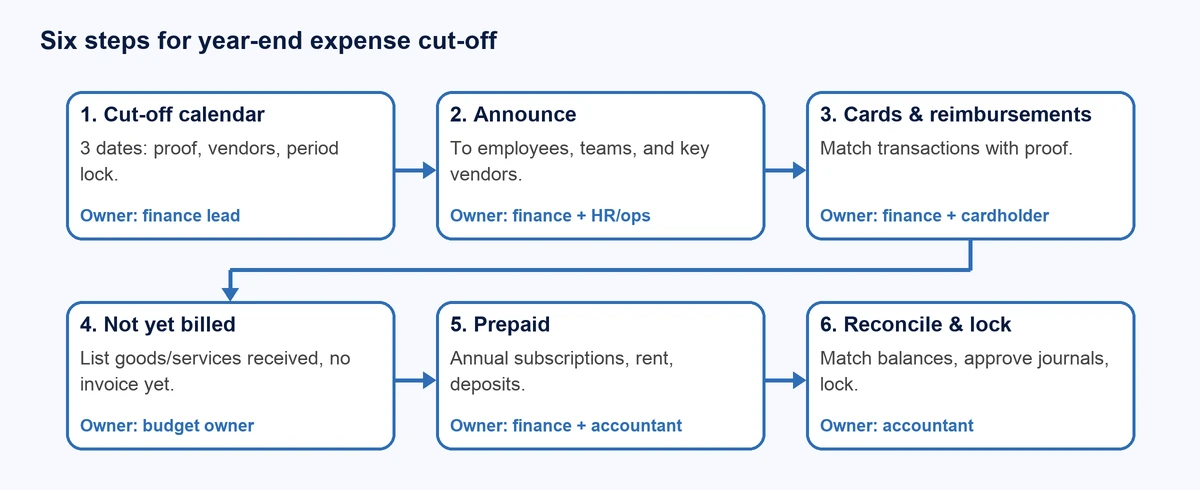
1. Set the cut-off calendar
- Owner: the finance lead.
- Trigger: early December (ideally the first week).
- What happens: write down three dates: the deadline for reimbursement requests and card proof, the deadline for vendor payment requests, and the date for reconciliation and period lock.
- Evidence: a written announcement that people can refer back to.
- Exception: expenses above a certain amount, or urgent ones, may pass the deadline with the finance lead's approval and are logged as exceptions.
2. Announce it to the whole team and key vendors
- Owner: the finance lead, with help from HR or ops.
- What happens: send the announcement to employees, the marketing team, and ops. For large vendors that often bill late, ask them to send invoices or estimated bills for work completed through year end.
- Evidence: an email or message that states the dates and the consequence (for example: requests after the deadline are processed in the next period).
3. Close out card transactions and reimbursements
- Owner: finance and cardholders.
- What happens: pull all card transactions up to the cut-off date, match them with proof, and flag the incomplete ones. Chase missing proof before the long holiday; for a guide, see what to do when proof of transaction is lost (in Indonesian). Settle any hanging reimbursements or give them a clear decision, following your company's employee reimbursement policy (in Indonesian). For the claim side, see our guide to employee expense reports.
- Evidence: a list of transactions that now have proof, and a list of the rest with an owner and a deadline.
- Exception: an employee is on leave and cannot send proof. Name their direct manager as the substitute to confirm the purpose of the transaction.
4. List goods and services received but not yet billed
- Owner: finance and the budget owner in each team.
- What happens: ask each team one question: "What have we received up to 31 December that does not have an invoice yet?" Collect the answers in one list with vendor name, description, estimated amount, and completion date. This list is input for the accountant to decide on accruals.
- Evidence: POs, contracts, proof of receipt, or a message confirming the work is done.
- Exception: the amount is uncertain. Use an estimate you can justify and mark it as an estimate.
5. Review prepayments and annual subscriptions
- Owner: finance and the accountant.
- What happens: flag December payments whose benefit continues into next year, such as annual subscriptions, rent, or insurance. Also check subscriptions set to auto-renew in early January; see this guide to SaaS renewal review policy (in Indonesian).
- Evidence: an invoice or contract that states the service period.
- Exception: small amounts. Ask the accountant whether there is a lower threshold below which everything is expensed immediately.
6. Reconcile, review, then lock the period
- Owner: the accountant and the finance lead.
- What happens: match bank balances and card transactions to the books, review differences, post the approved accrual and prepaid journals, then lock the period. A cash-flow review helps check whether the year-end balance looks sensible; see this business account cash-flow review (in Indonesian).
- Evidence: the reconciliation report and a record of approval.
- Exception: transactions arrive after the lock. Record them in the next period with a note; do not reopen the period without approval.
What Cut-Off Question Applies to Each Type of Expense?
Not every expense is treated the same way. The criteria are simple: when the goods or services were received, when they were paid for, and who knows the status. The table below helps finance ask the right question of each team.
| Expense type | Example | Cut-off question | Who knows |
|---|---|---|---|
| Card transactions | Ads, supplies, travel | Is there proof and a clear purpose before the deadline? | The cardholder |
| Reimbursements | Transport, client meals | Was it submitted before the deadline with complete proof? | The employee and their manager |
| Work done, not yet billed | Agency, contractor, maintenance | Was the work completed before 31 December? | The budget owner |
| Annual subscriptions | Software, domains | How much of the benefit falls next year? | Finance and the accountant |
| Vendor advances or deposits | Production deposit, events | Have the goods or services been received yet? | The budget owner |
| Overseas vendor payments | SaaS, advertising | Which exchange rate and date does the recording use? | The accountant and Tax |
Illustrative Example: A December Campaign Invoice That Arrives in January

Illustrative example (not a Monit customer case): Bima, in finance at a 30-person startup, receives a Rp45,000,000 agency invoice dated 6 January for a campaign that ran from 10 to 28 December. Because there is no "not yet billed" list, the amount does not make it into the December report. The result: December marketing costs look low and January suddenly balloons.
With step 4, the marketing team already reported on 20 December that the campaign had finished and that the invoice would be around Rp45,000,000. The accountant decides how to record it, and the January invoice is simply matched against the estimate. A small difference gets explained instead of discovered later.
What Mistakes Happen Most at Year End?
- Equating cut-off with the payment date. What usually decides it is when the goods or services were received. Confirm with your accountant.
- Announcing too late. A deadline announced on 24 December will not be followed.
- Chasing card proof only for large amounts. Many small transactions add up to a significant total.
- No "not yet billed" list. Every team assumes finance already knows.
- Reopening a locked period without approval and a note.
- Missing early-January auto-renewals that could have been anticipated from the subscription calendar.
How Does Monit Help?
Monit does not replace your accountant, but several features listed on the monitpay.com product pages help with the work above:
- Card transactions: corporate cards show transactions in real time (who, where, which card), so finance can pull a transaction list up to the cut-off date without waiting for an end-of-month report.
- Proof and categories: expense management automatically matches and categorizes receipts, with customizable approval workflows.
- Reimbursements: reimbursement reads receipts from the mobile app, approvals can be set by amount, category, or department, and approved reimbursements can be paid in one batch.
- Vendor invoices: account payable receives invoices by email or upload, has OCR, and shows real-time invoice status, including due-date reminders.
- Bookkeeping: accounting integration syncs transactions, bills, and receipts to Xero, QuickBooks, Jurnal, and Accurate, with markers for items that are queued, synced, or need review. More guidance: connecting card transactions to accounting (in Indonesian).
Honest limits:
- The product pages do not state that Monit creates accrual or prepaid journals, calculates cut-off, or locks accounting periods. That is still done in your accounting system and by your accountant.
- Automatic receipt matching and categorization still need human review. The integration page says users decide the account mapping.
- The result figures on marketing pages (for example, hours saved) come without methodology, so do not use them as internal targets.
- Monit is a technology company, not a bank. Business accounts are provided by partner banks that are LPS members, and payment services are provided by Bank Indonesia-licensed operators.
If you would like to see how card transactions, receipts, and sync to the books run before the close, you can start a conversation with the Monit team.
FAQ
When should the internal cut-off be set?
Earlier than 31 December, usually one to two weeks before, depending on team size and leave schedules. The goal is to leave time to chase proof and build the not-yet-billed list. The exact date is an internal decision, so adjust it to your audit calendar, company holidays, and how your vendors tend to send year-end invoices.
Is an invoice dated January for December work recorded in the old year?
Generally the reference point is when the service was received, not the invoice date, so the cost may need to be recognized in December. The exact treatment depends on your accounting policy and your accountant's judgment. Prepare supporting documents such as the PO, the contract, and confirmation that the work was completed before 31 December.
What about annual subscriptions paid in December?
Part of the benefit usually falls in the following year, so they may be treated as prepaid expenses. The amounts and method depend on company policy, including any lower threshold for small amounts. Ask your accountant, and keep invoices that state the service period so the split is easy to explain during an audit.
An employee submits a reimbursement after the deadline. Is it rejected automatically?
Not necessarily. The policy should state that late submissions are processed in the next period, with exceptions for specific cases approved by the finance lead and logged. What matters most is that the rule is clear and announced before the deadline, so decisions do not feel arbitrary and are easy to defend.
Does the cut-off affect tax?
It can, for example in when an expense is recognized or in withholding obligations on certain payments. Do not conclude this on your own. Involve your tax team or tax consultant from early December so accounting and tax decisions stay consistent, and refer to the official rules that apply to your company before setting an internal policy.
Conclusion: Start With the Dates
A year-end cut-off is really a small discipline that starts early: one calendar, one announcement, one list of expenses not yet billed, and one reconciliation before the period is locked. Once the dates are clear and announced, most January surprises can be prevented.
Next step: write down your company's three cut-off dates today and schedule the announcement for this week. To see card transactions, proof, reimbursements, and vendor invoices in one flow, open the Expense Management page or contact the Monit team.
Rizky Agusta
AuthorDigital Marketing Specialist
Rizky is a Digital Marketing Specialist at Monit with experience in B2B, tech, and MICE content.